I’ve decided to extend the functionality of my hypervisor with an Intel Arc Pro B70 GPU. This will be the second GPU in the system, and it’ll be dedicated exclusively to my always-active Linux host that handles the bulk of my internal LAN containers and services. My old RTX 5070-ti will remain exclusively reserved for my local workstation VM to accelerate the desktop, CAD, games, and other workloads that require CUDA dependent libraries to run.
The goal for this upgrade is to unlock a large video memory pool for use primarily with local inference in AI workloads, as well to provide hardware acceleration for video encode and decode within the container stack(s). I will also be testing the Virtual Function (VF) features present on the Arc Pro that allow logical splitting of the GPU into slices that can be separately passed to virtual machines with the xe-drivers, as it unlocks some interesting options in practical applications.
Why Intel?
The answer boils down to three components: cost (Nvidia), reliability (AMD), and features (Intel).
Nvidia is too expensive
The current cost of relatively modern 32GB VRAM cards from Nvidia is upwards of 3000-4000€, which is a price point I’m simply unwilling to stretch to. An investment that large is only sane if there is a guaranteed return on it. As is, my inability to reliably leverage the performance of local inference makes an investment that large too risky. Had the pricing been sane, I would’ve gladly stretched for a 5090 at around 2000-2500€, but that is simply an unattainable price on the markets for now –and will probably be for at least a decent while longer.
AMD is too unreliable
The reliability of AMD’s hardware, firmware, and software libraries has been consistently poor for the past decade, besides the relative openness. I can’t afford to take a risk on a platform that is known for not delivering even basic functionality when the expenditure is this large out the gate. ROCm has not matured sufficiently in the past 10 years for me to have much faith in its future, specially with how fragmented AMD’s ISA details are across their product range. Therefore even at an around equal price of 1500€ to Arc Pro B70 in Europe, the AI Pro R9700 is not an option despite its decently higher throughput.
Intel offers new features
Intel has historically had a strong track record in hardware, firmware, and driver support. Their signal processing has also been very reliable since forever, making their media engines an alluring addition. This strong performance and positive trajectory has been specially evident in the growth of the Arc-series. And for me that is enough to bet on Intel’s future performance –wouldn’t it also be nice for them to succeed for the whole market? The more matter of fact answer on features is the large 32GB VRAM pool, and the sufficiently high performance of the card in traditional workloads and inference, with a sprinkling of the first-party VF functionality on top.
Why jump on the AI train?
It’s evident at this point that LLMs –even as they are– hold a lot of potential and capability. The current limiting factor appears to be how and where they’re applied; and; I would very much like to learn to take advantage of that acceleration. The immediately sensible application to me would be in reducing the administrative burden on documentation and maintenance tasks, and that’ll also be my first practical target application in its use.
Essentially my goal on local inference is currently to somehow weave it into the workflow so it can handle documenting session contents. This way I would have to spend less time writing down my own notes on the boring and less important parts for each project, freeing my time for the actually challenging and interesting learning and implementation details.
The AI would start out as a high-level assistant that handles menial tasks related to keeping track of project progress and documents. Allowing freezing and unfreezing projects when time is too limited to continue, without losing track of where to continue in the future. It could grow via additional features –loops, effectively– as deemed appropriate. This slow-paced advance would also be beneficial in constructing a data storage system that works for both the machine and the human, and integrates seamlessly into the existing ZFS- and Git-backends that I run locally.
Okay, time for some fun
For starters I did some basic tests regarding the PCIe-passthrough and VF functionality, and their performance and reliability across and between Windows 11 and Linux VMs. Naturally, I also did some local inference benchmarking to see what the B70 can muster.
Below is an excerpt of lspci when the xe driver is loaded, and the card is split into one VF:
03:00.0 VGA compatible controller: Intel Corporation Battlemage G21 [Intel Graphics] (prog-if 00 [VGA controller])
	Subsystem: ASRock Incorporation Device 6025
	Flags: bus master, fast devsel, latency 0, IRQ 133, IOMMU group 16
	Memory at f607000000 (64-bit, prefetchable) [size=16M]
	Memory at e000000000 (64-bit, prefetchable) [size=32G]
	Expansion ROM at fbe00000 [disabled] [size=2M]
	Capabilities: [40] Vendor Specific Information: Len=0c <?>
	Capabilities: [70] Express Endpoint, IntMsgNum 0
	Capabilities: [ac] MSI: Enable+ Count=1/1 Maskable+ 64bit+
	Capabilities: [d0] Power Management version 3
	Capabilities: [100] Alternative Routing-ID Interpretation (ARI)
	Capabilities: [110] Null
	Capabilities: [200] Address Translation Service (ATS)
	Capabilities: [420] Physical Resizable BAR
	Capabilities: [220] Virtual Resizable BAR
	Capabilities: [320] Single Root I/O Virtualization (SR-IOV)
	Capabilities: [400] Latency Tolerance Reporting
	Kernel driver in use: xe
	Kernel modules: xe

03:00.1 VGA compatible controller: Intel Corporation Battlemage G21 [Intel Graphics] (prog-if 00 [VGA controller])
	Subsystem: ASRock Incorporation Device 6025
	Flags: bus master, fast devsel, latency 0, IRQ 139, IOMMU group 37
	Memory at f600000000 (64-bit, prefetchable) [disabled] [size=16M]
	Memory at e800000000 (64-bit, prefetchable) [virtual] [size=32G]
	Capabilities: [70] Express Endpoint, IntMsgNum 0
	Capabilities: [ac] MSI: Enable+ Count=1/1 Maskable+ 64bit+
	Capabilities: [100] Alternative Routing-ID Interpretation (ARI)
	Capabilities: [200] Address Translation Service (ATS)
	Kernel driver in use: vfio-pci
	Kernel modules: xe

04:00.0 Audio device: Intel Corporation Device e2f7 (prog-if 00 [HDA compatible])
	Subsystem: ASRock Incorporation Device 6025
	Flags: bus master, fast devsel, latency 0, IRQ 135, IOMMU group 17
	Memory at fc000000 (64-bit, non-prefetchable) [size=16K]
	Capabilities: [50] Power Management version 3
	Capabilities: [c0] Vendor Specific Information: Len=14 <?>
	Capabilities: [60] MSI: Enable+ Count=1/1 Maskable- 64bit+
	Capabilities: [80] Express Endpoint, IntMsgNum 0
	Capabilities: [100] Advanced Error Reporting
	Capabilities: [140] Latency Tolerance Reporting
	Kernel driver in use: snd_hda_intel
	Kernel modules: snd_hda_intel
PCIe-passthrough
Passing the card directly to a VM works just like any other PCIe-device. You can create a
resource mapping in Proxmox or just pass the device address manually after you’ve made sure
the card is grabbed by the vfio-pci kernel module.
The PVE host used in this context was running on 7.0.14-12-pve.
Windows 11
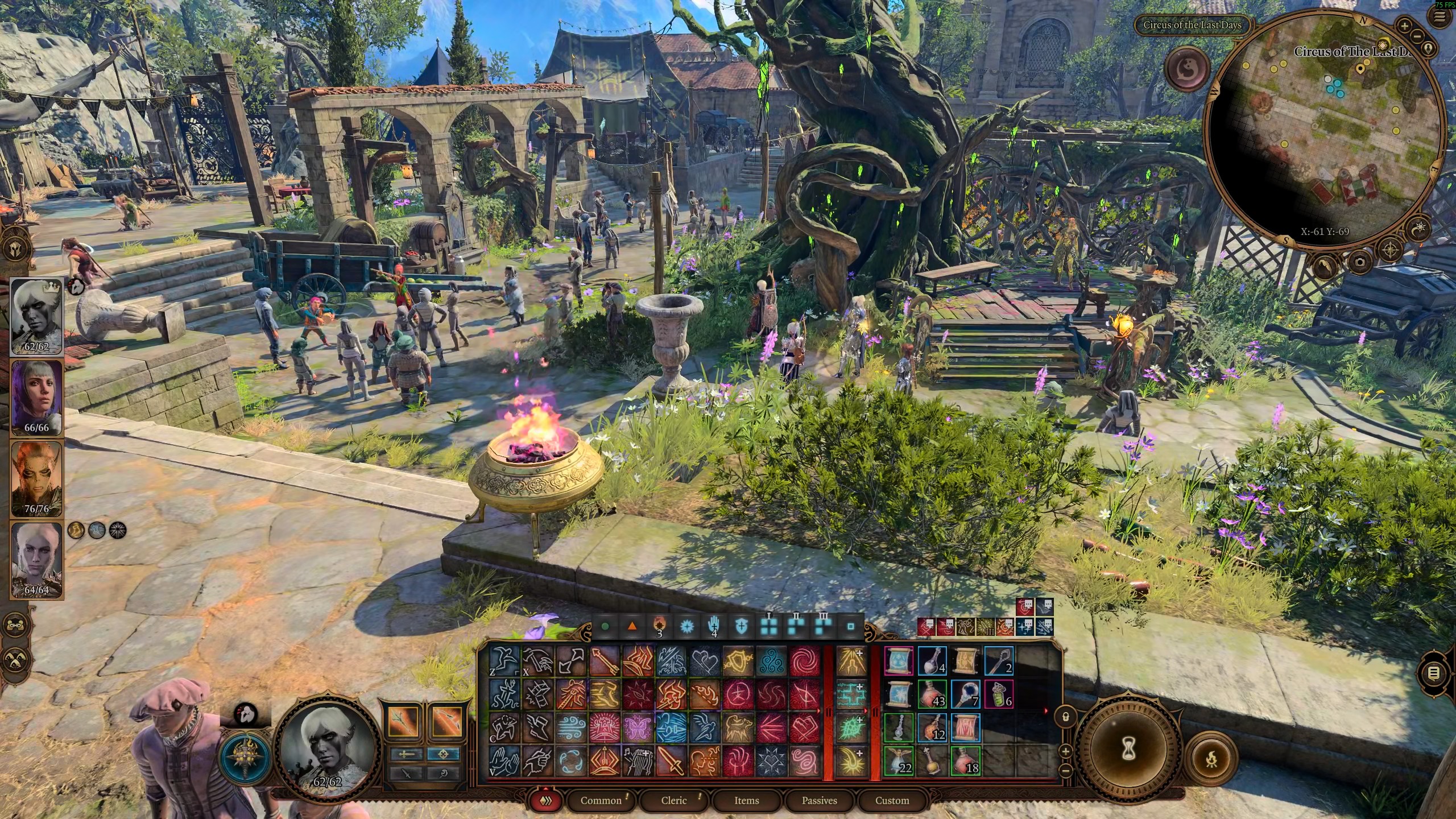
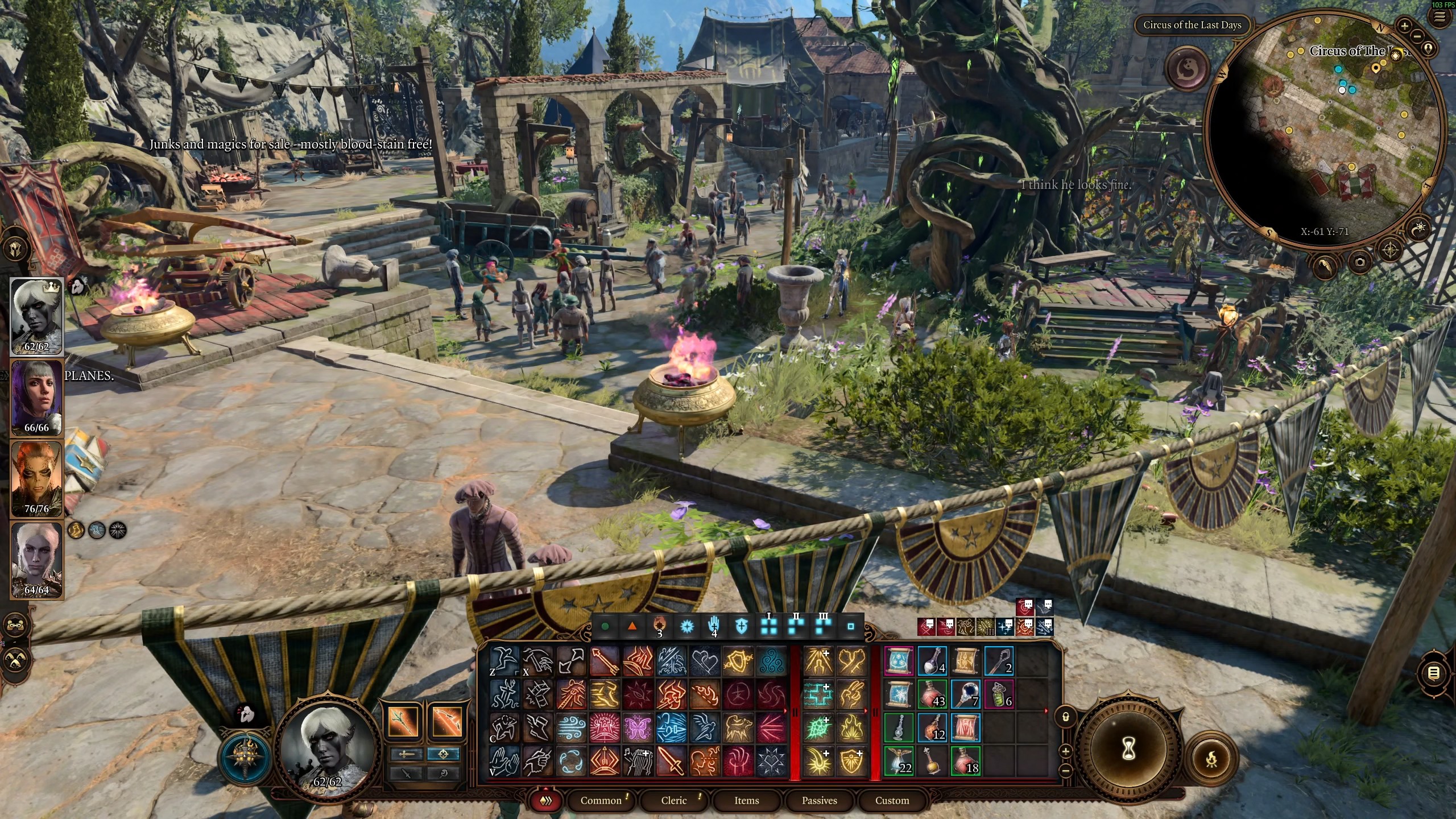
Performance at 1440p on “Ultra” details is honestly very good. The card can run games somewhere between 70-120fps depending on the level of upscaling (none to balanced) going on. Below are a few screenshots of Baldur’s Gate 3 and Deadlock running under Windows 11. The FPS indicator is from Steam’s overlay with an accuracy that is approximate at best. The screenshot is compressed and not reflective of upscaling tech performance (sorry).
Both VMs were dedicated a single CCX on a Ryzen 9 9900X and 24GB of DDR5-5600 (non ballooning).
Baldur’s Gate 3 (Act 3), 1440p Ultra, Xess TAA.
Deadlock, 1440p Ultra.

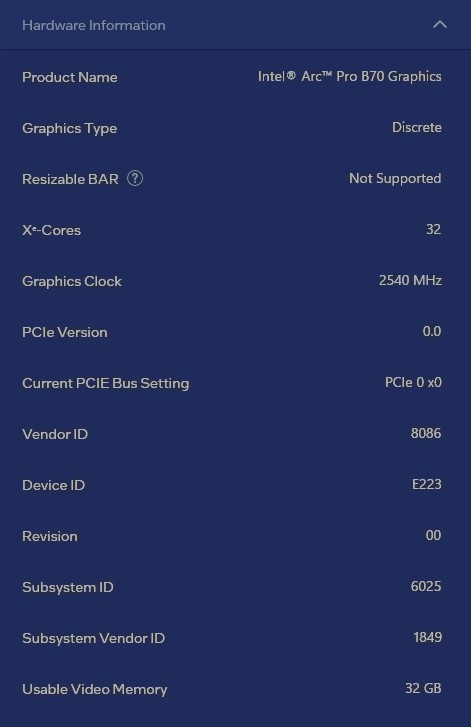
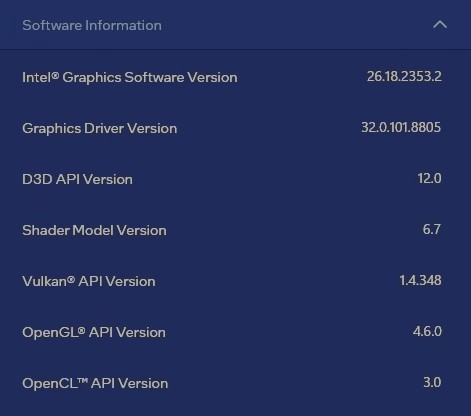
The Intel driver application showed the following information when the tests were ran:
Virtual Function between Linux and Windows 11
The Virtual Function implementation is not nearly as well supported under Windows as it is on Linux.
When the card was controlled on Proxmox by the xe drivers, and split into two VFs, the performance (especially frametimes)
fluctuated wildly under the Windows host. There are also visual artifacts that destroy the image,
making the experience unusable (more so than what is visible in the image below!). The artifacts appear
all over the screen appearing and disappearing from one frame to the next, and they take the shape of
macroblock corruption.

The performance on Linux was much better, and there was no artifacting like under Windows. In general it seems like the VF performance is actually very good, but the largest issue for gaming workloads would be the inconsistency in the speed at which the card can deliver frames if you were to use Windows. It almost feels like there is something funky going on with the scheduling when the VF is used by Windows, where as on Linux the frametimes stay stable and consistent.
Generally this makes the gaming experience usable even at 1440p (ultra) during 2xVF setups, though the split-performance on this card would lend itself more to 1080p (ultra) gaming.
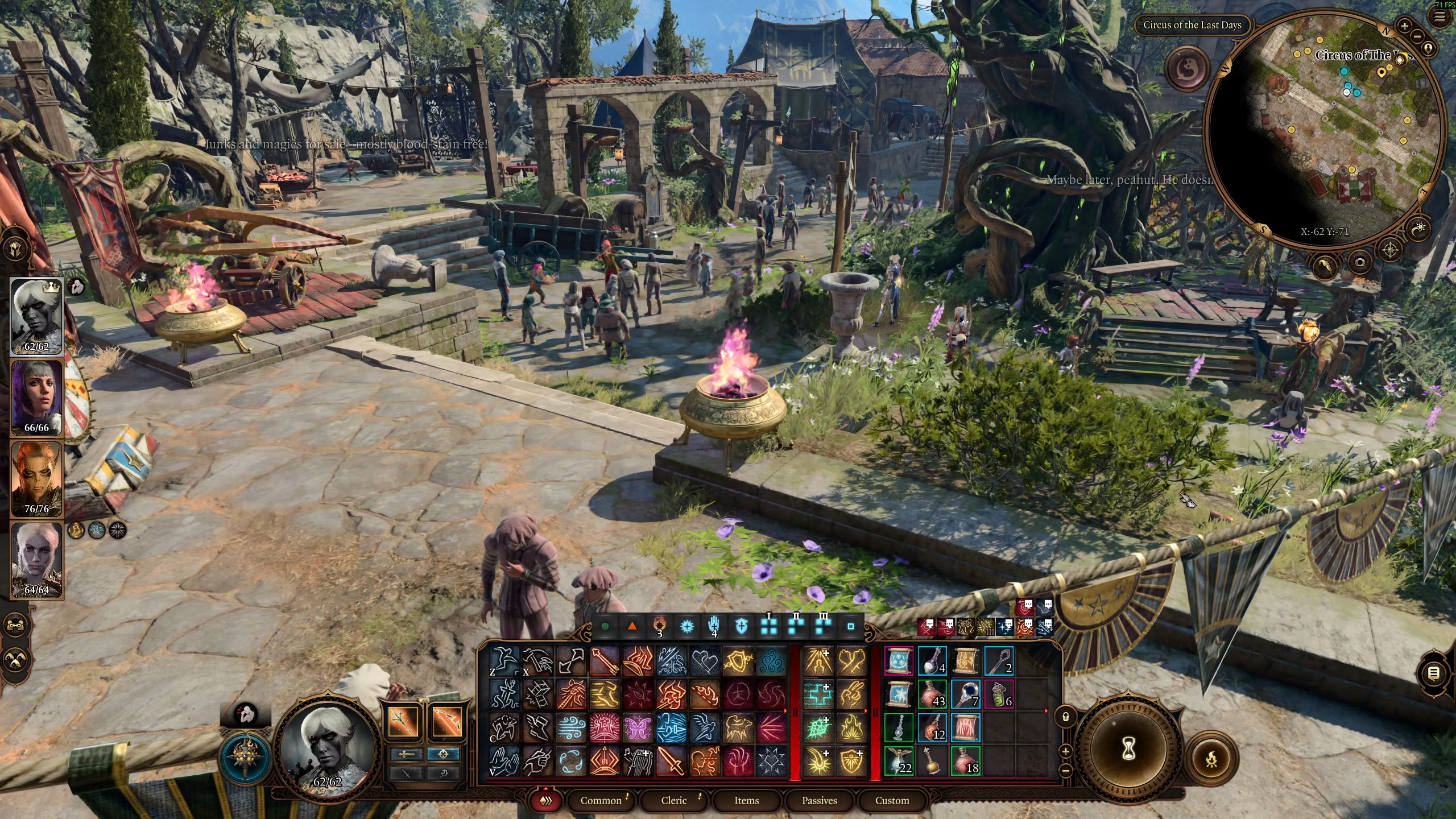
Below are two screenshots of running Baldur’s Gate 3 (Windows 11, 1440p, Ultra, 71fps) and Deadlock (Linux, 1440p, Ultra, 53fps) simultaneously when the card is split “in-half”. FPS is decent, but real-time encoding by the media engines struggled on Windows-side noticably on both HEVC and AV1 codecs. It’s also important to note that when pushing the card like this, the rest of the system is liable to become a bottleneck in various ways, which requires precautions and careful resource allocation.
Baldur’s Gate 3 (Act 3) at 1440p on Ultra with Xess (Balanced), during simultaneous use.
Deadlock at 1440p on Ultra under Linux (Arch Linux 7.1.8-arch1-3), during simultaneous use.

The driver appears to load-balance well between the virtual functions when some are on low-utilisation, seeing as when the Linux VF was just on the desktop the Windows 11 peformance in Baldur’s Gate 3 rose up to 103fps, showing that the driver does allow more proportional use per VF when there is enough hardware that is un-utilised. This leveled off nicely when the other VF was stressed again under Linux.
Local LLM performance
The following data and observations are from a custom llama.cpp build within a Ubuntu LTS docker container on Linux Debian. The details are mostly unimportant, but the numbers show a general direction and actual functionality.
I tested the card with Gemma 4 and Qwen 3.x models. The general trend was predictable based on the card’s hardware. This GPU is meant to provide, relatively speaking, ample VRAM to run decently sized and capable local models with a healthy context window. Speed is sort of secondary, and the card really likes to operate in the sweet spot of MoE models that need nearly an order of magnitude less activations than their dense counterparts.
The dense models in 27B to 35B category yield about 15-25 tok/s depending on the specific model and quant being used. While the MoE models (A3B or A4B) produce much higher throughput at around 50-65tok/s, again, depending on quant and model. My personal choice for this card, and in general, is the Gemma 4 MoE model.
Some more notes on the current state of local models, and what I’d use with this card…
Google’s models feel vastly less derivative than any of the Qwen models do, and the thinking efficiency is also much superior compared to the dense Qwen 3.8 27B. Gemma 4 is also quite nonchalant regarding the guard-rails, and very well may not require any abliteration for regular use, as it’s not prone to nagging even under some pretty unhinged poking and prodding.
Contrast the two responses between Gemini and Gemma 4:


With that bullying out of the way… In general this card does very well when used in the efficiency sweet spot across the board. You want to fit a ~25-35B class MoE model with a resonable quant, ideally with QAT if available, to have very large context, but also maintain high inference speed on the output side. I honestly also would avoid overthinking models, as the lower decode speed will naturally feel much more sluggish when the absolute throughput capacity of this card isn’t top-tier. Overall, a strong practical showing that doesn’t waste resources.
Conclusion
This card is a de facto server GPU. It has a healthy amount of video memory for running many applications at the same time, even supporting the much coveted Single-root IO Virtualisation (SR-IOV) direct from the upstream by Intel. That alone makes this a very special card.
I’m very happy with the inference performance of this card, but naturally I wish for the ecosystem to grow and mature over time. Right now building the proof of concept container stack took a weekend, but it’s running –and quite well I might add. I wouldn’t really use this card for gaming, except for a little bit of casual fun, but it’s still much better than what most people have. So I really wouldn’t turn my nose up at it in that regard either.
The bottom line is that this card delivers on its promises already, albeit some facets are a little shakey –specially on Windows. But let’s be honest, nobody cares about Windows. It’s time for that thing to step aside anyway. Go full throttle on the Linux experience, Intel.