Baseline Description
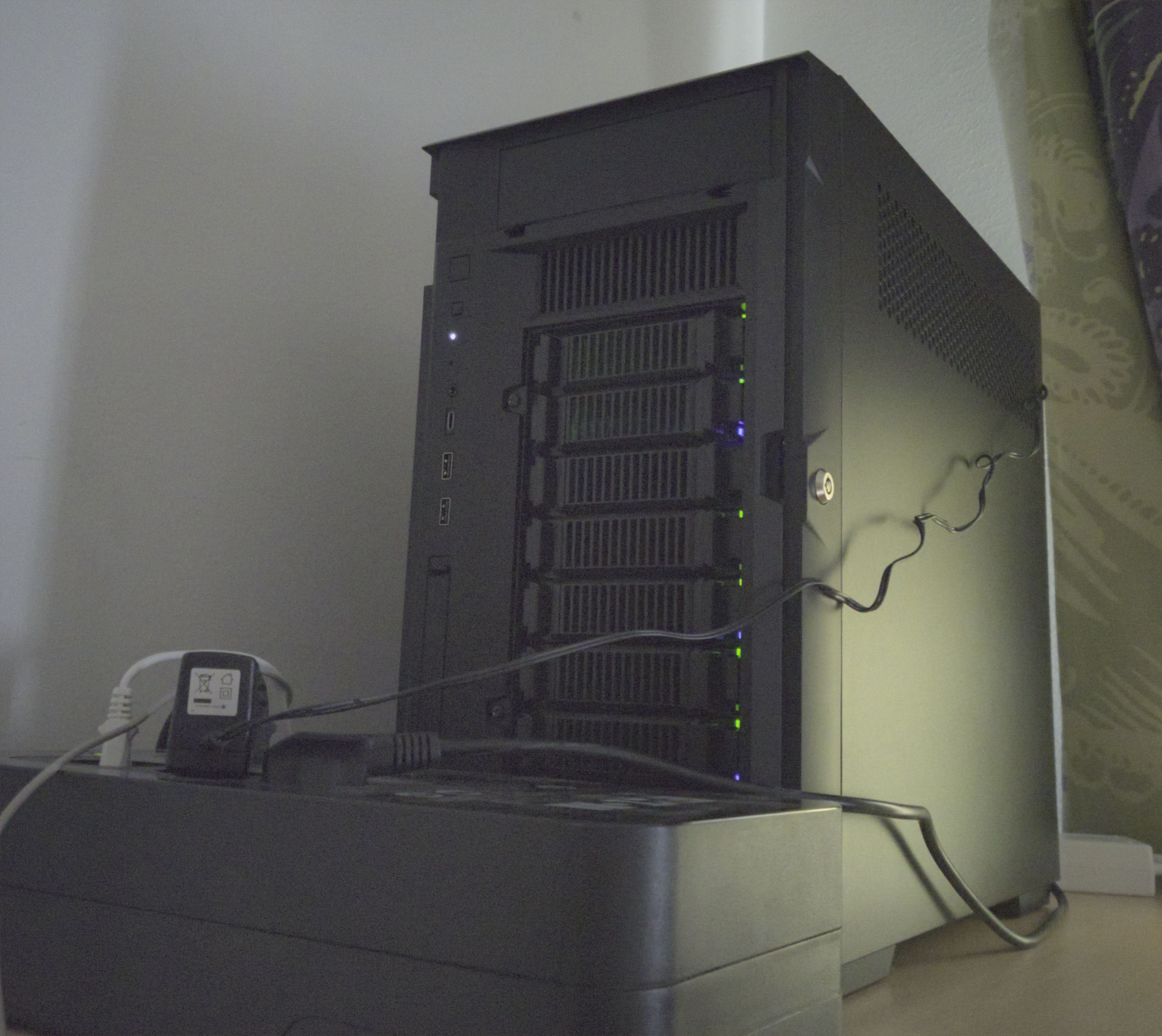
This post details my current server configuration, responsible for hosting most internal services and machines on my LAN and LAB networks. The setup relies heavily on virtualisation and containerisation to segregate the LAN and LAB subnets, as well as to save on costs without compromising on the available processing power, memory, network interfaces, and reliable storage where needed, while remaining very low power for the functionality it provides.
Background and Motivation
For the day-to-day I need a laptop, but I also had a desktop PC for heavier workloads, and a small Intel NUC as a server for self-hosted services and virtual machines to run programs and automations on around the clock. As time passed and needs changed, the server wasn’t quite powerful enough anymore, so I started relying on my desktop PC for those unmet needs. Effectively twisting the composition to two servers and one personal laptop. This increased running costs, maintenance complexity, and overall reduced the efficiency of the systems as resources couldn’t be effectively allocated to where they were needed.
So as my older machines –all running on 8th generation Intel chips– started to show their age, I had to consider my options to upgrade and consolidate. Luckily for me, I was proactive and had parted out the old hardware in its entirety while it still had value and managed to recoup a decent amount of cash for the planned new configuration. Selling all my old machines and finding some unbeliavable open-box deals allowed me to ultimately build a strong new configuration, although at the cost of a few months of downtime.
Hardware Requirements
I’ve always been staunchly against running power-hungry hardware for home use and having many physical machines to manage. There are three rather obvious reasons for this: initial and running cost, heat and noise output, and administrative complexity. Bulk of the typical workload for home use, even for advanced users, tends to be light background tasks. Things like Home Assistant automations, cron jobs in containers, small database operations, and filesystem tasks. Therefore large rack-based multi-machine setups have never made much sense to me in a home setting –resiliency concerns aside.
Occassionally more demanding workloads will crop up, and this should be taken into account when sizing the system components so as to not lack needed capabilities; however, it’s very important to not overdo it when selecting components. Finding a good balance between efficient idling and needed peak power was one of my leading goals for the new configuration.
Another crucial point I needed to consider was the available internal and external interfaces. The real limiting factor in the old NUC at the time wasn’t the CPUs processing power, rather the lack of internal interfaces for PCIe devices and disks, neccessitating use of USB-ports and adapters to extend functionality. While the USB drivers for disks (UAS) have been solid in my use for years on Linux, they’re no match for internal connectivity when it comes to reliability, latency, iops, and throughput. The same is true for USB network adapters –though they’ve gotten much better over the past five years.
My previous power requirements disqualify older secondhand enterprise and business gear for the most part, except for interface cards, refurb drives, and some other miscellaneous components. While cheaper at the onset to acquire, they idle at much higher power targets and produce a lot of noise and heat –not an ideal choice for home use. Similarly, heat and noise is also an issue with mini PCs. Although initially appealing for their efficiency, mobile chips on the desktop are often paired with woefully inadequate cooling solutions that produce an annoyingly high pitched sound, and a case/pcb design that almost always makes retrofitting better cooling difficult or impossible.
With all that in mind, here are some general spec requirements I outlined for myself when drafting the configuration. These are based on what I know about my existing and predicted performance needs for the near future.
- Hypervisor Requirements (~minimum)
- CPU: 12 cores
- RAM: 64GB
- ETH: 1x10GbE, 1x1GbE
- PCIE: Gen 4.0 x16 with bifurcation, Gen 4.0 x8 for use with HBA
- CASE: mini/micro ATX, must have 5x3.5" HDD mounts and 2x2.5" SDD mounts
- PSU: 550W with Platinum rating
- BMC: Preferable, but not mandatory
- GPU: Nvidia (CUDA), 16GB VRAM, less than 200W max draw, AV1 HWENC
As for workloads, the hypervisor must be able to virtualise multiple VMs and containers for two internal virtual bridges (LAN, LAB) and their subnets. This includes a Home Assistant VM with all the relevant automations and coordination software for IoT networks like Zigbee and Matter over Thread. Also, since the hypervisor will be subsuming the duties of my old desktop PC, there must be enough processing power and memory to simultaneously keep running the active server workloads and virtualise a desktop for CAD or gaming use that is accessed via Ethernet.
Component Selection
I’m going to just list the components I ended up choosing below with some of the relevant specifications and notes. The choices were made in early 2025 based on what was available from suppliers, and some parts were significantly discounted as open-box returns. So the value proposition for this build may not make sense depending on whatever the market prices are at MSRP –for me though, they were about as good as it could get at the time.
- Case (Silverstone CS382)
- Micro-ATX NAS chassis
- 8-bay hot-swappable drive bay with SATA/SAS backplane
- 5.25" bay for future expansion (SSD drive cage, etc.)
- lockable front panel
- robust dust filters with toolless removal
- Great through-case airflow (front to back).
- Motherboard (Asrock Rack B650D4U-2L2T/BCM)
- Micro-ATX
- AM5, support for AMD EPYC 4004/4005 and Ryzen 9000/8000/7000
- DDR5 2DPC, 4 DIMM slots, support for ECC/non-ECC UDIMM (max 192GB)
- PCIe5.0 x16 (w/ bifurcation), PCIe5.0 x4, PCIe4.0 x1
- 2x RJ45, 10GbE via Broadcom BCM57416
- 2x RJ45, 1GbE via Intel i210
- M.2 PCIe5.0 x4 (M-key)
- 4x SATA 6Gb/s
- Baseboard Management Controller (BMC) via ASPEED AST2600, has Realtek RTL8211F for RJ45 1GbE access
- Removable BIOS chip
- This motherboard has enough Ethernet interfaces to provide both LAN and LAB virtual bridges a dedicated 10GbE and 1GbE interface. The chipsets are also known to have robust support in FreeBSD and Linux.
- CPU (Ryzen 9 9900X)
- While the chosen motherboard supports AM5 EPYC CPUs, their availability was really poor with high pricing compared to the consumer CPUs. The X3D chips are poor for productivity workloads because of the inconsistencies introduced by X3D, so I decided to go for the 9000-series chip with 120W default TDP.
- 12c/24t
- 4.4GHz (up to 5.6GHz)
- L1/L2/L3: 960KB/12MB/64MB
- TDP: 120W (default), 65W (ECO)
- 2x2R max speed DDR5-5600
- 4x2R max speed DDR5-3600
- RAM (Kingston KSM56E46BD8KM-48HM)
- DDR5-5600 CL46
- 6G x 72-bit (48GB)
- 2Rx8 w/ ECC
- I Really struggled on whether to start with just one DIMM, or get two. Now that the price has risen from 200€ to 1500€, I’m rather pleased with my choice to get two…
- PSU (Seasonic Focus PX-550W Platinum)
- A solid PSU with a high efficiency rating, and plenty of range for the planned configurations power needs.
- Transferred over from the old build.
- PCIe #1: GPU (RTX 4060-ti 16GB)
- Effectively the consumer version of a professional Nvidia card with low power draw, Cuda, AV1 NVENC, DLSS and frame-gen, but without the ECC VRAM found on the professional cards.
- Contrary to sentiment online, the RTX 4060-ti 16GB is one of the best consumer cards Nvidia has released in a long while if you really need the features (Cuda, 16GB VRAM, NVENC, DLSS) it provides. The low power draw perfectly complements a 24/7 configuration, and the AV1 encoder enables high quality remote desktop streaming for CAD and gaming applications at 120Hz on 1440p.
- P (Idle): ~3W
- P (NVENC streaming desktop/cad): ~30W
- P (max, streaming+workload): ~180W
- PCIe #2: HBA (LSI SAS 9211-8i)
- This is a tried-and-true HBA, often used with HDD pools in IT-mode. It’s readily available everywhere for a low price, and functions just fine for my current use and the SAS/SATA backplane in the case.
- This would get upgraded in the future if I ever have the opportunity to upgrade to an NVME-based SSD pool, but those parts are currently prohibitively expensive. A good 5.25" U.2 drive cage alone costs around 300-500€, and the HBAs can be triple that.
- ZFS Pool #1 (SSD)
- 2 x 2TB WD Red
- Transferred over from the old build.
- This pool is the currently most significant limiting factor due to lower than desired IOPS it can provide. Upgrading this to a more performant and robust solution would cost thousands of euros, so not in the cards any time soon.
- ZFS Pool #2 (HDD)
- 5 x 4TB WD Red / Seagate
- Transferred over from the old build.
- Main mass storage, which is complemented by a couple larger single HDDs for scrap storage/ingest. Like the SSD pool, this is a candidate for an upgrade in the future due to 5TB/drive being rather low density nowadays.
- Cooling
- The CPU cooler is a Noctua NH-U9S, from an older build. I initially wanted to use a larger NH-D15S, but Noctua’s compatibility page misleadingly marks the cooler as compatible with my Asrock Rack motherboard, despite occluding one of the PCIe slots.
- The case fans are all Noctua as well. While they’re expensive, the sound level and profile is just way too good to pass up on.