Background information
A rural building needs reliable internet connectivity for regular household use. The location is not currently used year-round, so finding a sufficiently performant solution that is cost effective is key.
Having gotten a very reasonable quote for building fiber connectivity to the location, it was the initial plan; however, it quickly became apparent that the ISPs inflexible plan structure was simply not cost-effective in the medium term –much less over the 60 month contract period. A good price on fiber doesn’t matter if its not getting any use most of the year, that’s just called burning money.
Therefore I decided to investigate other available options, namely cellular connectivity.
Requirements and expectations
Even as a rather advanced user, my connectivity needs to the internet are not vast. I don’t really have much time to play video games anymore, so I don’t need sub 10ms latencies to multiplayer servers. And if I want to download something, I don’t mind automating systems so they work in the background with traffic shaping.
I figure a modest 50mbps downlink and 10Mbps uplink with ~50ms latency will be entirely sufficient –and I have a good feeling achieving that will be more than doable for the location with current generation radio technologies.
Site details
Before I could begin considering practical deployment options, I had to understand what sort of features were inherent to the site. This information will dictate what kind of equipment needs to be procured, desired features, and supported technologies (e.g. generation, target frequencies, antenna specifications).
Candidate towers
The foremost limiting factor is the local cellular infrastructure and available operators and their service plans. This is a detail that I can’t control, so I have to stay within these specifications.
For longevity I will also plan slightly ahead, perhaps optimistically, so that the deployment can remain usable even when current technologies are slowly updated to the next generation of radio tech. In practical terms this means that I will simply not consider any LTE/4G only modems.
The following is a brief overview of the site, important geographical features that may impact radio performance, and the two best-candidate cell masts.
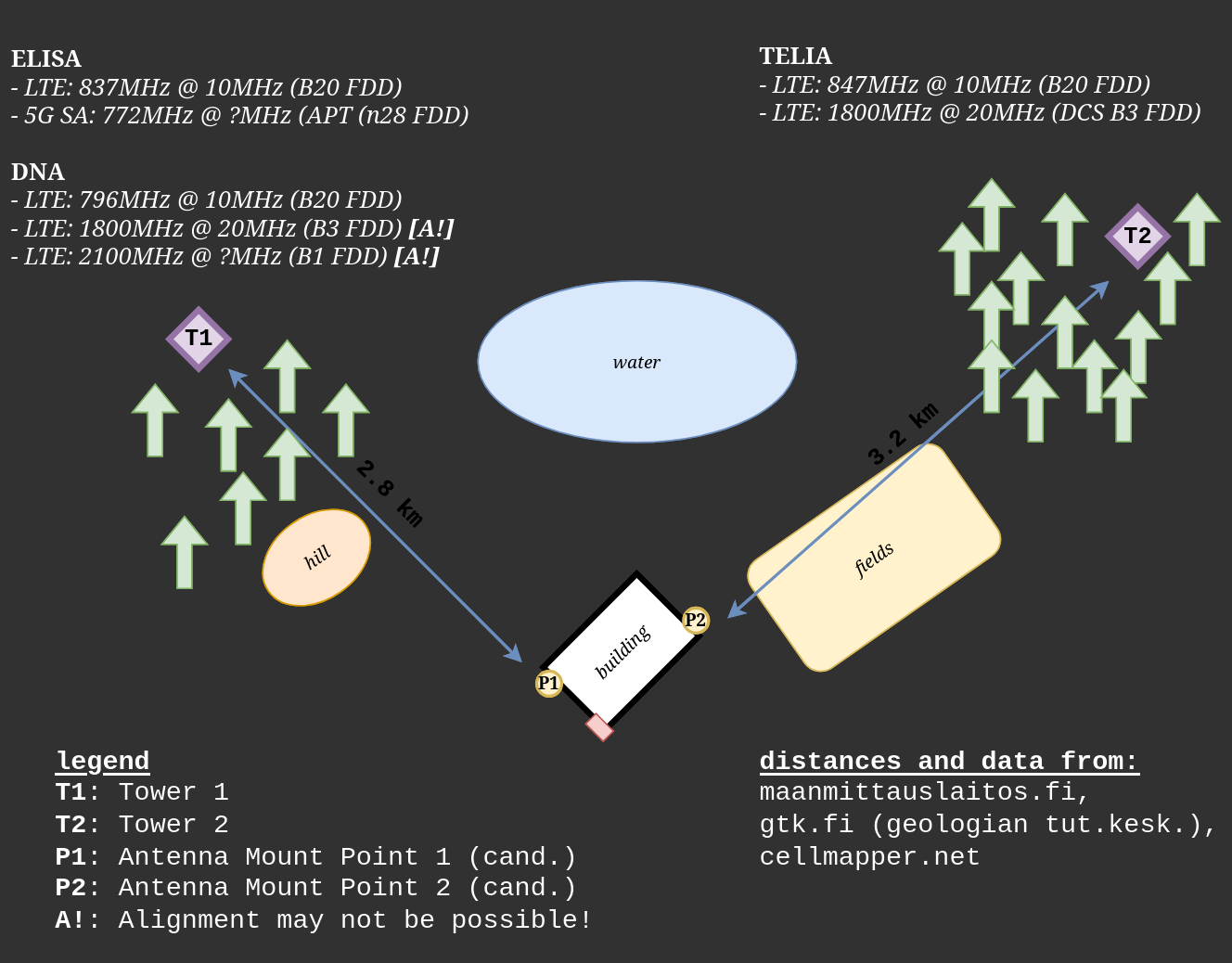
From the figure we can see there are three operators in the area between two of the closest towers. This is great for competetive pricing, and if I ever want to have failover between two service providers (or towers).
Tower 1 (T1) is the immediately more appealing target, due to having two different operators and newer radio technology. This information will help me decide on antenna properties and mounting location for the site.
It is unclear how supported Carrier Aggregation (CA) is between the operators and available towers, or what the congestion levels are. Ultimately real performance can only be reliably defined after practical benchmarking on-site.
Geographical features
The area is rural, and luckily, there aren’t many obstructions that could intefere with connectivity to either tower.
T2 has essentially as clear a line of sight (LOS) as possible to the site, while T1 has a rather sizeable hill almost in the way of direct LOS (see previous figure). I doubt any of the present features will pose a problem to connectivity.
The following data is extracted from a contour map to provide relative heights from the site to T1 and T2 (respectively).
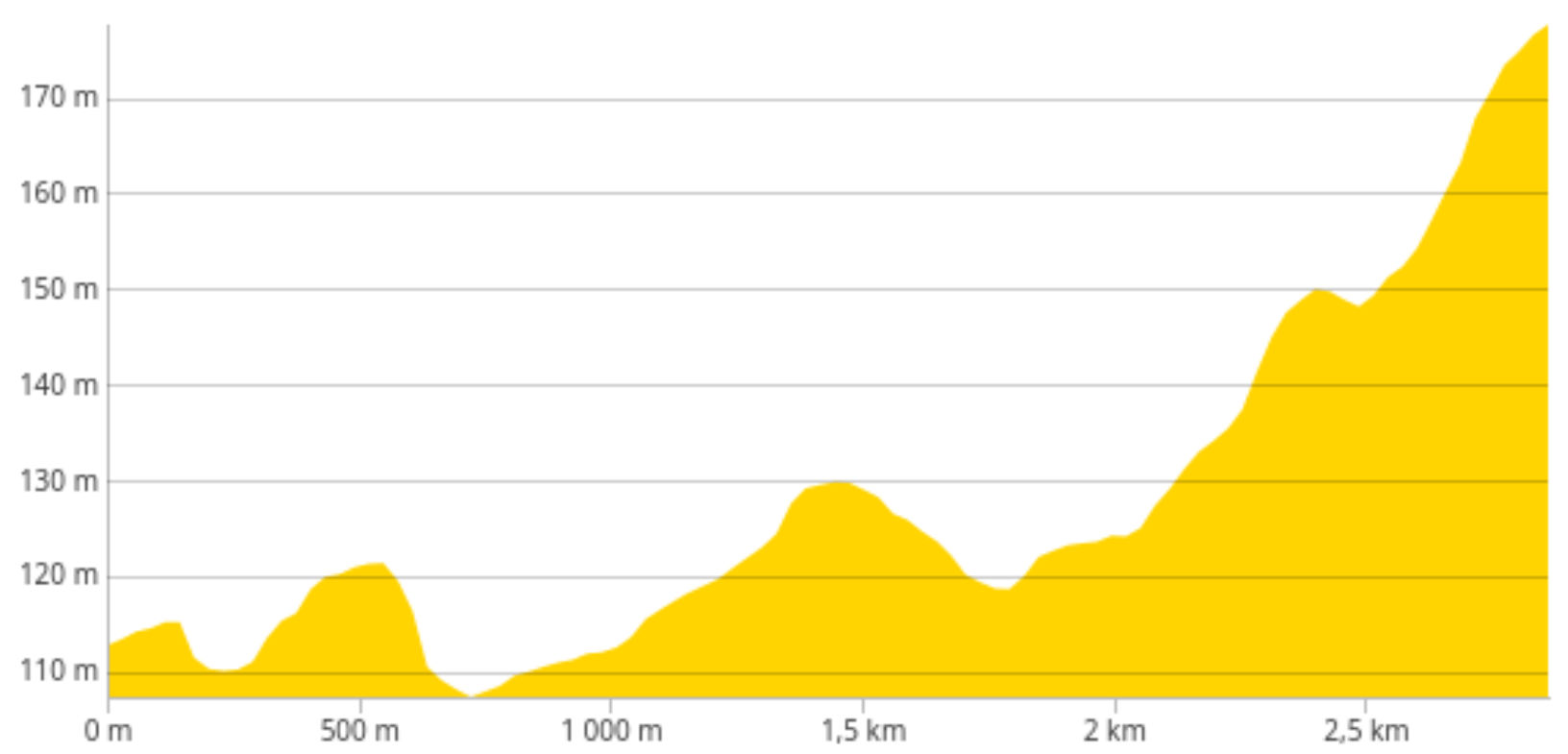
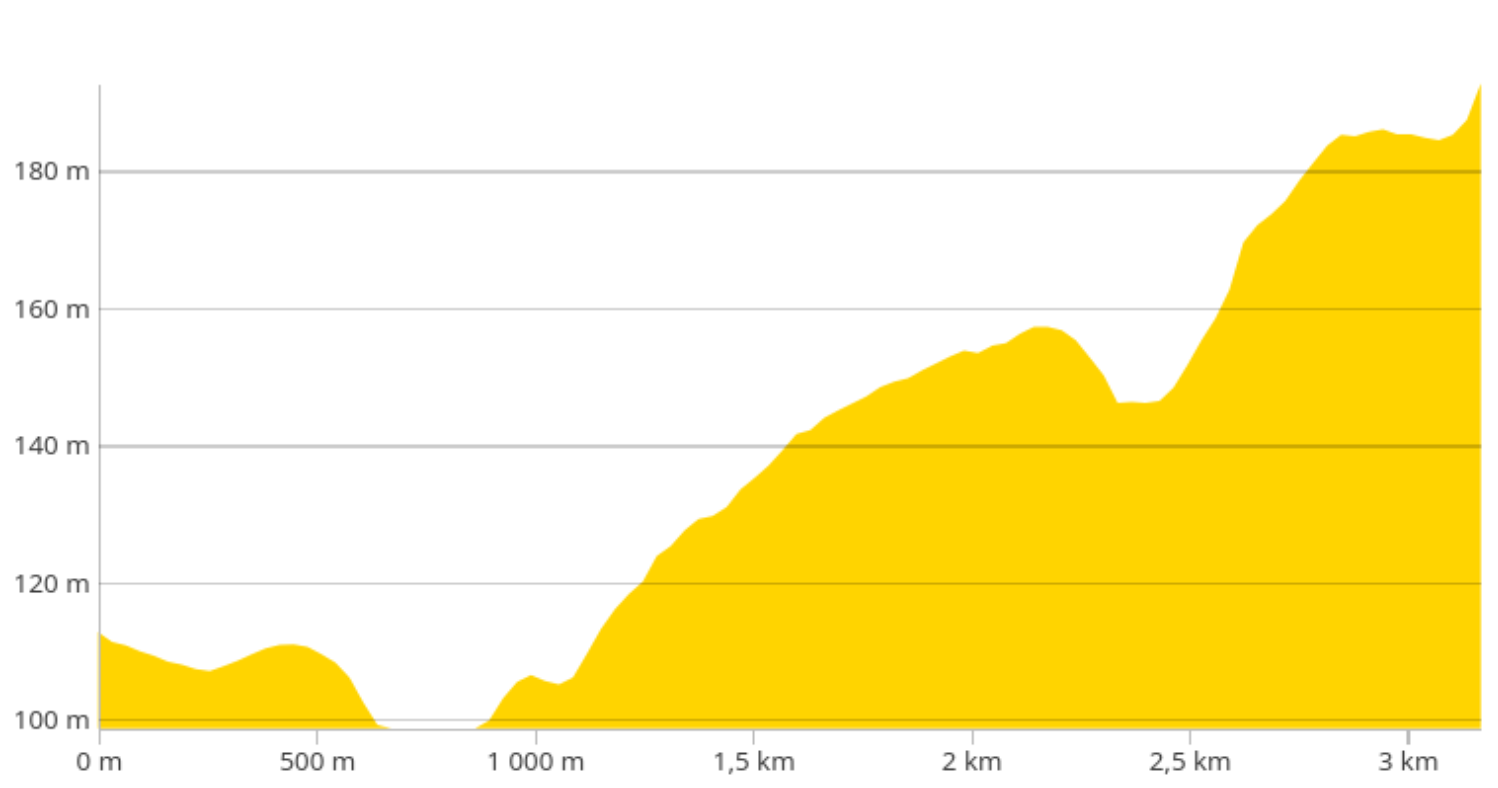
We can see that in both cases the ground-level deltas are excellent and the masts have great vantage to the site.
Considering all the previous information, I can be quite confident that the site can get reliable connectivity within my set requirements and goals.
Choosing hardware
Now that I know the locally supported radio frequencies, generations, and rough bearing of the mast cells, I can begin narrowing down on what hardware could fulfill my requirements and fit into my budget.
Modem and routing
Choosing the right modem is crucial for at least the following reasons:
- Radio generation
- Mandate >=5G for longer service life. Even as LTE/4G eventually gets phased out, the device can transition to 5G-only networks.
- Supported OS
- Will define expected service life through availability of system updates.
- Prefer something with FOSS options (e.g. OpenWRT)
- External antenna connectivity
- Crucial for first-rate external antenna support to enhance connectivity.
- Software support for remote management options
- E.g. air heat pump, security cameras
- GPS support
- Would be nice for accurate and reliable network time, but not a must.
Based on the following checklist and general consensus on the internet, I narrowed the hunt down to the following companies and their offerings: Mikrotik, Teltonika, and GL-iNet.
Essentially all the options that fit my checklist cost over 350€ as of writing. This initial investment is still cheaper compared to the deployment of fiber to the location, so all is good. Still, I don’t want to pay more than 400€ for the modem, as the value seems to sharply decline past that mark. I will also have to account for the possible external antenna.
If you saw the banner for this post, you’ve already been spoiled on what I eventually settled on, but; here is the rundown of the candidates nonetheless:
- Mikrotik Chateau 5G R17 ax
- IPQ-6010 (arm64), 4 core, 1GB RAM, 128MB NAND.
- RouterOS (not foss, but trusted and feature rich)
- Modem: 5G RGE650E-EU (Quectel)
- MIMO DL: 4x4
- MIMO UL: 2x2
- Bands: LTE/5G (excellent), and 3G.
- Ethernet: WAN(1x2.5Gbit), LAN(4x1Gbit).
- Price: 360€
- SMA: acceptable external connectivity (can be modded)
- Wifi 6
- Useful online material at confusedbird (thread 119), for antenna mappings and internal layout.
- Flyer
- GL-iNET Spitz AX (GL-X3000)
- MT7981A (arm64), 2 core, 512MB RAM, 8GB NAND.
- OpenWRT (modified, should have mainline support)
- Modem: 5G X62 (Qualcomm)
- MIMO DL: 4x4
- MIMO UL: 2x2
- Bands: LTE/5G (excellent), and 3G.
- Ethernet: WAN(1x2.5Gbit), LAN(4x1Gbit).
- Price: 355€
- SMA: great external connectivity (6x)
- Wifi 6
- Flyer (they call this a datasheet, it’s not really)
- Teltonika RUTX50
- IPQ4018 (armhf), 4 core, 256MB RAM, 256MB NAND.
- RutOS (modified OpenWRT, has mainline support)
- Modem: RG501Q-EU (Quectel)
- MIMO DL: 4x4
- MIMO UL: 2x2
- Bands: LTE/5G (excellent), and 3G.
- Ethernet: WAN(1x1Gbit), LAN(4x1Gbit).
- Price: 500€
- SMA: excellent (4x cellular, 2x wifi, 1x gps)
- Wifi 4 (2.4GHz), Wifi 5 (5GHz)
- Flyer, Datasheet
So what’s actually the difference between these models? For the sake of technical details, lets ignore the price outlier.
Both Mikrotik and Teltonika use Quectel modems, which I’ve had better experiences with compared to Qualcomm. Notable is also the OS, where the Chateau uses Mikrotik’s RouterOS, instead of OpenWRT. RouterOS vs OpenWRT is more of a taste question, as I would trust both options for an acceptable service life and quality of features.
Comparing the CPUs, RAM, and NAND next. While having more sounds nice, I’m not entirely convinced of the benefits. I shouldn’t be running a lot of services on the modem itself, and I’d rather throw a small SBC machine onto the network for more advanced services anyway, rather than risk the stability and security of my networks backbone.
Ethernet and Wifi is mostly similar accross the devices, with Teltonika’s RUTX50 falling behind quite significantly on the Wifi spec. Wifi 5 is still “fine” for regular use, and most of my endpoint devices don’t have super contemporary modems either, so I’m more inclined to not care. Furthermore, if the on-site network grows beyond this one device it would make more sense to have a dedicated L2 network and WAP, at which point that won’t be an issue.
Antennas
The overwhelmingly strongest option would be a directional antenna aimed at the tower that provides best service on-site (tentatively T1). And that will be the plan, as long as the modem is meant to be left on-site for remote management.
The benefit of an omnidirectional antenna is simply that it could interface with both T1 and T2, and make failover simple. It could also technically be taken with if the modem needs to be used elsewhere more easily. An omnidirectional antenna is also less likely to be affected by harsh weather and lose its bearing if something really rough happens.
There are a lot of antenna options with varying specifications. Importantly I should focus on the low-frequency 700-800MHz band first, which is used for well-penetrating rural radio connectivity (on both T1 and T2). The antenna should also be 4x4 MIMO, since the candidate modems are all 4x4. It would also be nice if I could somehow bundle Cell, Wifi, and GPS into one antenna, but that’s a little overtly optimistic. And it may be more cost effective to buy a separate antenna (or WAP) for Wifi anyhow if long-range is needed for yard use.
Procurement
Modem
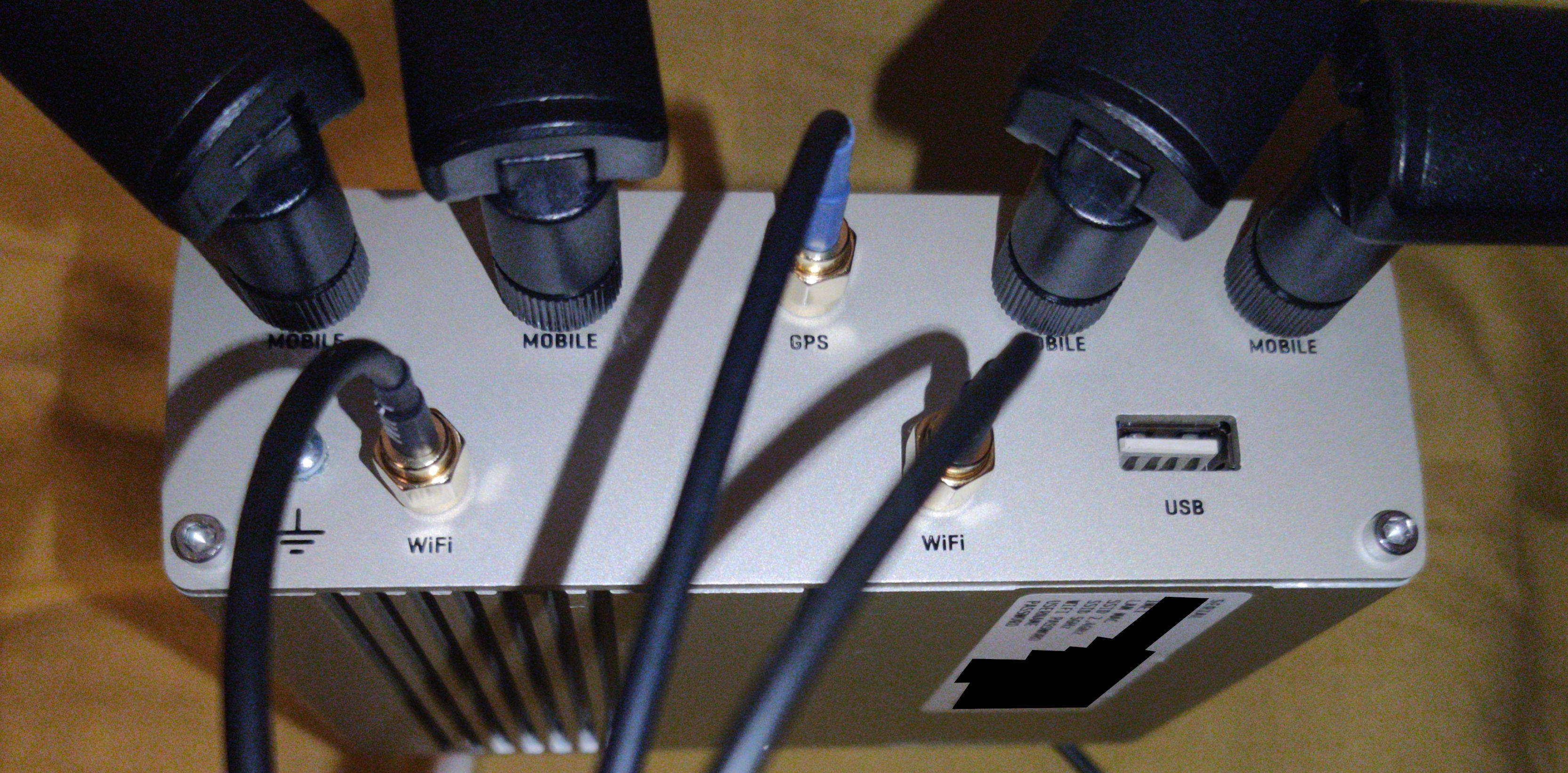
I chose Teltonika’s RUTX50 as the best candidate for the following features: OpenWRT, Quectel modem, Rugged chassis, SMA ports (w/o modding), and GPS. Regrettably it doesn’t have eSIM support, but my management plans don’t require them anyhow.
So what about the price? I didn’t want to pay over 400€ for the modem, but the MSRP for RUTX50 is between 500-600€. Ah, well. I happened to snag one very lightly (looks new to me) used for 350€ plus shipping locally. So with that, I didn’t blow my budget either and managed to get the device I preferred with excellent external connectivity.
Antennae
Omni-directional
Having tested the RUTX50 with its stock 4x4 5G antennas in the city, I was left underwhelmed by the connection quality. The throughput was decent, but the signal quality was shaky due to low reception and the uplink had a lot of jitter.
My testing environment was challenging for the small omnis due to where the ISP had their nearest 4G/5G tower and what the geography was like. It didn’t help that the tower was mostly designed to serve the area exactly the opposite direction of where I was and that it was because of that quite short as geography lended itself for it to have good vantage in its primary direction.
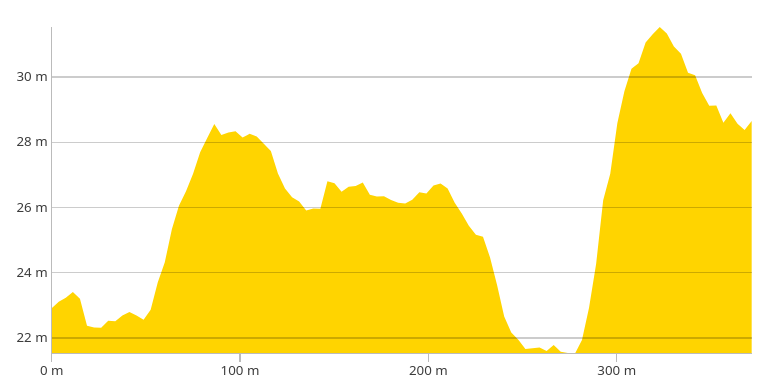
As can be seen from the contour data, there are quite a few factors that contribute to an attenuated signal from the local topography alone. Not only is there effectively a double-wall of earth in between the apartment and the small mast on the other side, the entire span is covered in a dense forest of tall trees. That’s a concrete physical obstruction, and the trees retain a lot of water which further worsen the outlook. And because that isn’t enough, I can’t actually even face the tower from the apartment. The best I can do is 90 degree offset, so I have to effectively use a side-cone.
Since I wanted the modem to be reliably useful in the city as well, I decided to shop for an omnidirectional antenna; and, after a couple days of hunting I came across Panorama Antenna’s lineup of 4G/5G omnidirectional antennas.
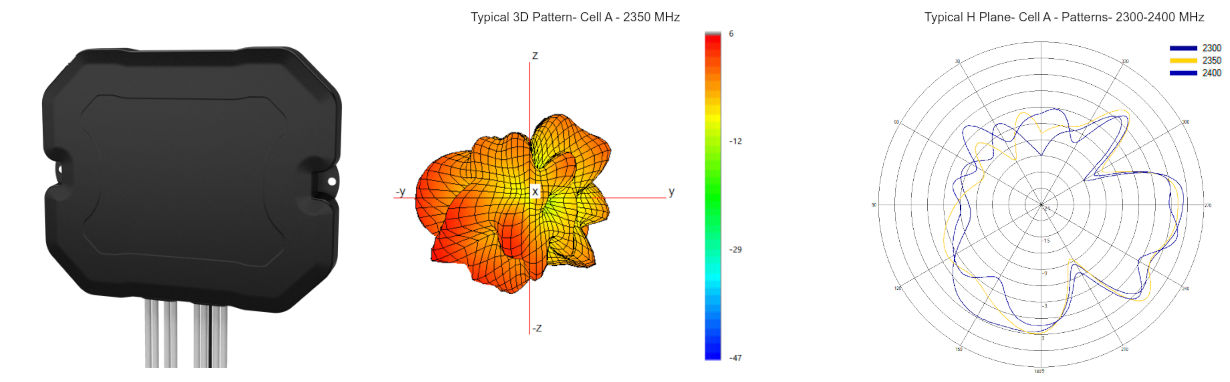
There were two models I contemplated (DMM4-6-60 and BAT[X]M4-6-60-[X]). Both were relatively small, primarily indoor antennas that could easily fit into a travel case and provided polarised 4x4 with decent coverage of low-band, mid-band, and high-band frequencies. The slightly larger BAT-model also had 2x2 Wifi antennas and a strong GPS antenna (26dBm).
Needless to say, but the BAT-model fit my requirements perfectly as it had not only the 4x4 Cell antennas, but also Wifi and GPS all bundled into a small form factor with good peak gain of about 7dBi at n78.
If you don’t need the Wifi/GPS antennas, the smaller DMM-4-6-60 can be found for 70-90€ and is probably about as good for cell connectivity. Where as the bigger BATGM-4-6-60-D is around 170-200€. The variant with 3x3 or 4x4 Wifi antennas I couldn’t even find available online.
Directional
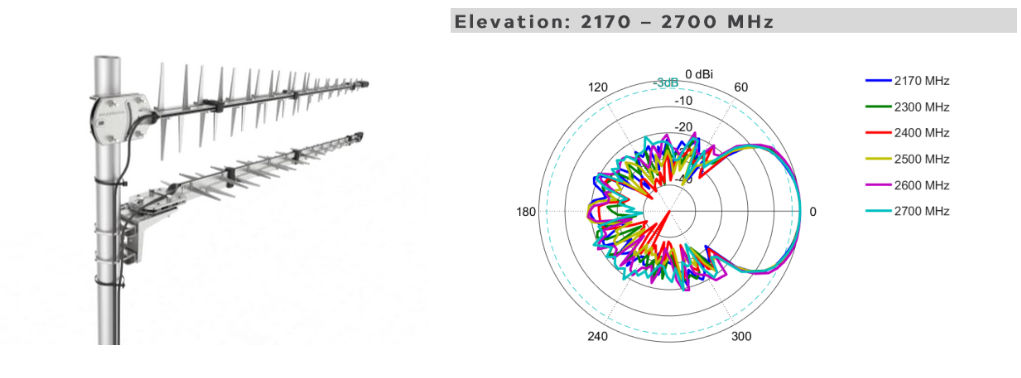
I didn’t plan on getting directional antennas after having bought the omni, but I saw a deal on a local marketplace for a pair of used Poynting LPDA-0092 for 40€ each, with all the mounting hardware included… I couldn’t really pass up on a deal that good.
It’s been a while since I played around with directional antennas, so I figured this is a good chance to get a pair of good quality ones for a very good price. Besides, these are passive, so they should be good virtually forever and may lend themselves to other projects in the future at their supported frequencies.
Validation
I’ll keep this rather short and outline the most important findings and performance characteristics, perhaps somewhat dissapointingly omitting the methodology; but, some of the tools used were: ping, iperf3, mtr, wifiman (ubiquiti), and the tools available on RutOS webui for cellular details and wifi.
Testing was performed on Elisa’s 4G/5G network using a prepaid SIM with the 3-day “5G Turbo 600Mbps” plan to eliminate bottlenecks of lower bandwith plans, and to guarantee access to the 5G network.
For the modem (RUTX50), I’m very pleased with the cellular performance on both 4G and 5G (NSA). Even with the small stock antennas I was able to get 300Mbps downlink and 20Mbps uplink, but the latency had rather large variance (20-100ms) and packet loss was more common than with the larger external antenna.
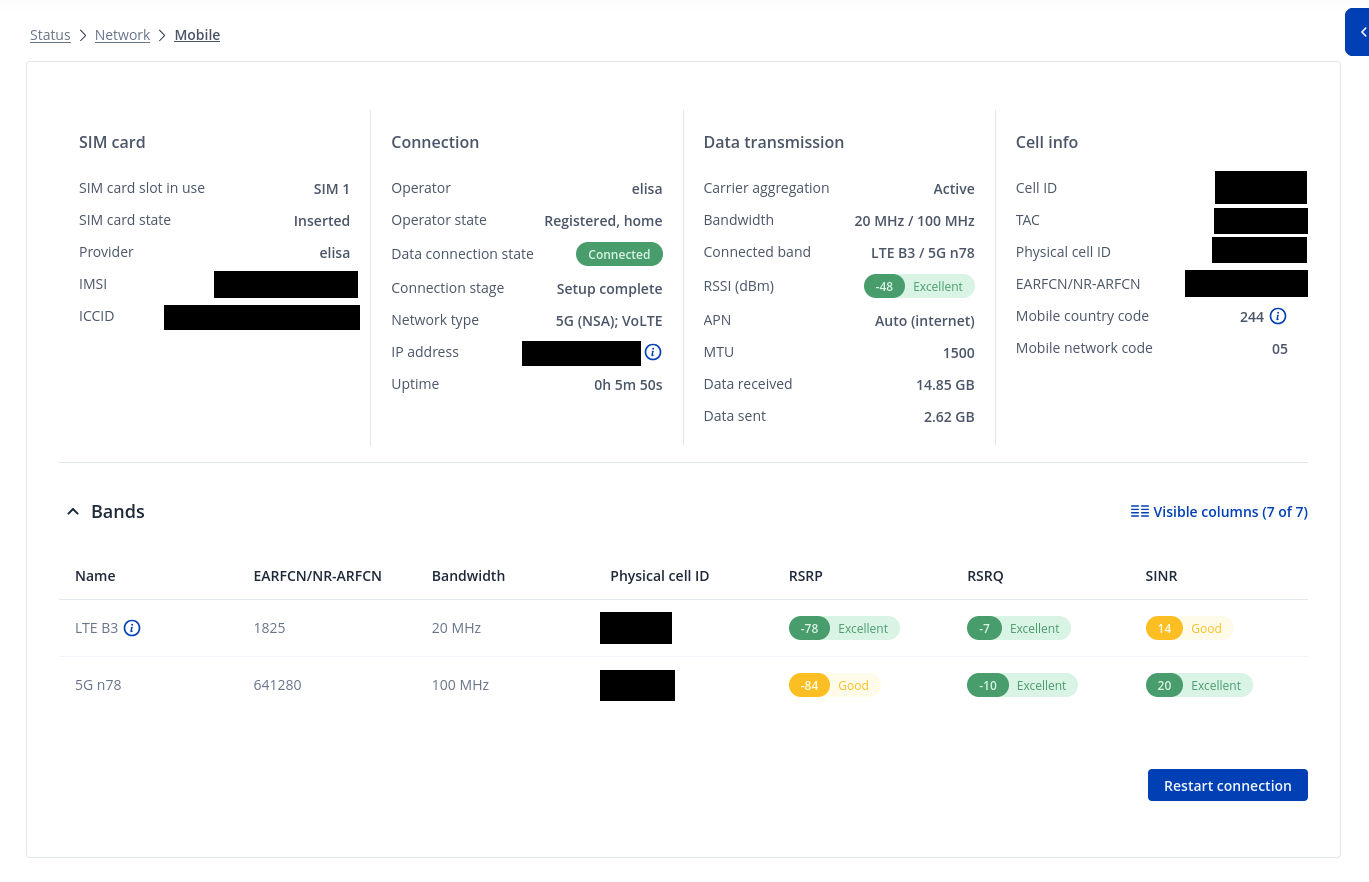
Using the BATGM-4-6-60-D cellular performance was excellent on all accounts, despite the challenging environment. Below is the typical connection stats for the previously detailed city environment.
Next up is the speedtest result ran on a friday afternoon / evening using the previously detailed connection.
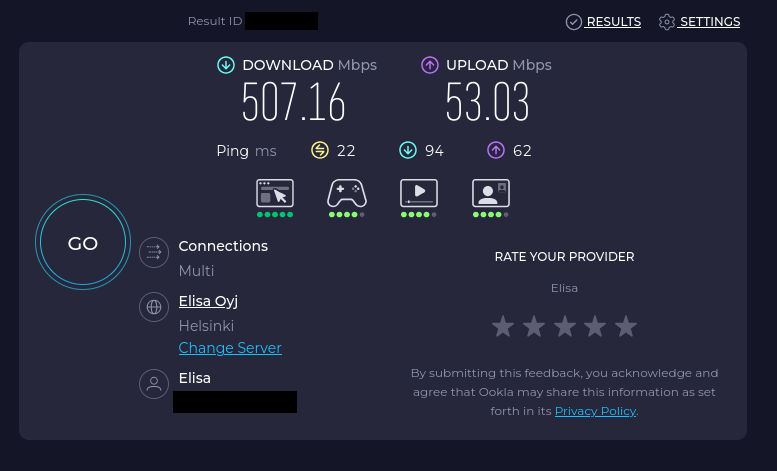
This looks very good, and massively overshoots my initial targets. Naturally out in the boonies the low-bands will carry less data, but I know for a fact that the modem is more than capable of reaching my requirements while also performing great in an urban setting.
I did some brief testing with just 2x2 of the cell antennas connected, and it’s very clear that having 4x4 greatly improved the connection stability in the city. So definitely aim for a 4x4 modem/antenna combo if expecting to rely on reflections in the environment.
Next up the GPS performance with the external antenna. There’s not much else to say on that, other than its performance is, again, excellent. It doesn’t matter which corner or closet I stuff the antenna into within the apartment. The modem always locks onto satellites (7-9 on avg.) when connected to the larger external antenna. I would consider this a very robust solution to guarantee accurate network time to machines.
Now for the downer part. The WiFi performance on the RUTX50 is below expectations, and it doesn’t appear that there is anything I can do to rectify the issue(s).
Wifi 5 should allow me speeds of about 500mbps, but in practice I was able to only get around 400mbps sustained. This is OK, but the bigger problem is the latency and packet loss on the RUTX50. The typical latency introduced by the Wifi hop is 17ms, which is simply dissapointing.
I’m comparing the RUTX50 5GHz performance to my old Unifi AP AC Lite WAP, which is also specced to Wifi 5. The Unifi can easily sustain 500Mbps (saturating the uplink) and holding a stable latency of around 2-4ms. If my modem to backhaul latency is 20ms, there is zero reason for my Wifi to be 17ms. This effectively makes the Wifi on the RUTX50 useless, unless there is a way to optimise the performance.
Now that all is done, I’m quite pleased with the results. I do wish the Wifi was more performant, but I guess you can’t have everything (unless you pay 800€ for the RUTC50 with Wifi 6E). This just means I need to provision a separate WAP to go along with the modem for optimal performance.